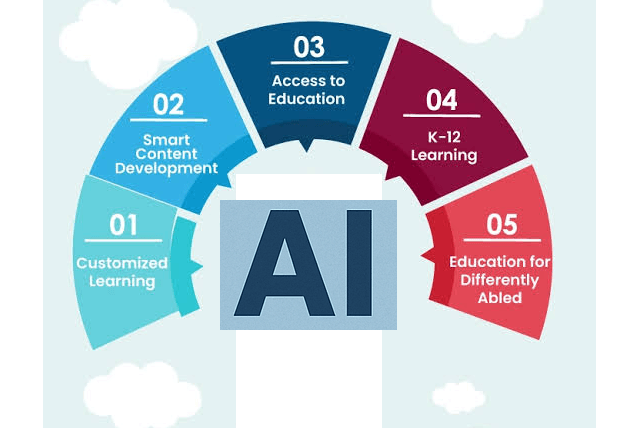
AI Tools for Parents: Here’s how to support your child’s learning without doing the homework for them.
If you’ve ever stared at a fourth-grade math problem and realized the method has changed since you were in school, you’re not alone. AI tools can now explain concepts, flag where a child is struggling, and adapt to different learning styles. The difference is mostly in how you use them.
This guide covers tools in four areas: homework support, concept explanation, progress tracking, and neurodivergent learners. It closes with ground rules that apply to all of them.
1. Homework Support and Monitoring
The best homework tools guide a child toward an answer rather than hand it over.
Khanmigo (Khan Academy). Built as a tutor, it asks guiding questions instead of giving answers. It also offers parents a view into what their child has been working on.
Photomath and Google Lens. Both can scan a math problem and show step-by-step solutions. They’re useful for you as the parent: check the steps, understand the method, then help your child without guessing. Handing over the answer directly to your child, however, defeats the purpose.
Google Family Link, Apple Screen Time, and Bark aren’t tutoring tools, they help you see which apps and sites your child uses during homework time and set boundaries around them. Whatever you choose, tell your child it’s in place. Monitoring works better as a shared agreement than as surveillance.
2. Explaining Concepts in Plain Language
Sometimes a child doesn’t need more practice, just a different explanation.
General AI assistants (ChatGPT, Gemini, Claude, and similar). These can explain photosynthesis with a pizza analogy, re-explain fractions in three different ways, or generate practice questions on demand. Most of these tools have age minimums in their terms of service, so check before handing a child their own account. A good alternative is using one together, with you typing the questions while your child watches.
A prompt that works well: “Explain long division to a 10-year-old using a real-life example, then ask me one question to check understanding. Don’t give me the answer.”
Quizlet and Duolingo. Quizlet turns notes into flashcards and practice tests, and Duolingo’s AI-driven features support language learning through conversation practice. Both work well for retrieval practice, which research consistently shows beats rereading.
3. Tracking Progress
Knowing where your child is stuck matters more than knowing how long they studied.
IXL and Khan Academy dashboards. Both show which skills your child has mastered and which need work, so you can target practice rather than guess.
Amira Learning and Microsoft Reading Coach. These listen to a child read aloud, notice mispronunciations or hesitations, and give feedback. They can flag early reading difficulties and give you something concrete to bring to a teacher.
Your school’s platform. Many schools use tools such as Google Classroom or ClassDojo that already show assignments and grades. Check what’s available before adding anything new.
A tip: look at progress data together with your child. Treat it as “here’s what we’re working on next” rather than a report card.
4. Supporting Neurodivergent Learners
For children with ADHD, dyslexia, autism, or other learning differences, the right tool can reduce friction rather than add to it. Needs vary a great deal between children, so treat these as starting points and talk to your child’s teachers or specialists.
For dyslexia and reading difficulties. Read&Write by Texthelp and Speechify convert text to speech, highlight text as it’s read, and support writing. Learning Ally offers audiobooks designed for students with reading differences.
For ADHD and executive function. Goblin.tools is a free set of simple tools, including one that breaks a big task (“write a book report”) into small, manageable steps. Visual timers and AI-assisted planners can also make time more concrete.
For autism and communication needs. AI-supported tools can help with social stories, visual schedules, and practicing conversations in low-pressure settings. Work with a speech-language pathologist or occupational therapist on what suits your child.
For visual or sensory needs. Seeing AI and built-in accessibility features on phones and tablets (text enlargement, voice control, screen readers) can make material more accessible.
The most useful principle here is to pick tools that remove a barrier, not tools that remove the learning. Text-to-speech removes a decoding barrier so a child can engage with ideas. That’s different from having the AI do the assignment.
Ground Rules for Using AI With Kids
Keep the thinking with your child. If the tool does the cognitive work, the learning doesn’t happen. Ask your child to explain the answer back to you.
Verify what AI tells you. AI tools can be wrong, sometimes confidently. Treat explanations as a starting point and double-check anything important against textbooks or teacher guidance.
Protect their privacy. Avoid entering your child’s full name, school, address, or other identifying details into AI tools. Read each tool’s privacy policy, especially for children’s data, and prefer education-focused products with clear child-privacy practices.
Follow your school’s rules. Some teachers allow AI for brainstorming but not for writing. Knowing the policy prevents unpleasant surprises.
Start small. One tool, used consistently, beats five apps opened once. Try it for two weeks and ask your child whether it’s actually helping.
Stay involved. No tool replaces a parent who sits nearby, asks “how did you get that?”, and notices when frustration is building.
The Bottom Line
AI can be a patient explainer, an organized progress tracker, and for many neurodivergent learners, a real source of independence. It works best as a support for your child’s effort rather than a substitute for it. Pick tools that fit your child’s actual needs, keep the conversation open, and let the technology handle the friction so learning can happen.
Tool features and age requirements change often, so check each product’s current terms and settings before you rely on them.

Leave a Reply