Algorithms and Flowcharts: Computer studies solutions for ICSE and CBSE students.
Algorithm
An algorithm refers to “rules or procedures” for solving problems and can be applied to almost all daily life activities. An algorithm lists the steps to solve any problem.
An algorithm makes use of a number of steps such as Analysis, Begin, Input, Processing and Output.
A pseudocode (false code) refers to language that is similar to English but also resembles code used in computer programming. For example, Read A.
Uses of algorithm:
- Used in developing computer programs.
- Can be used to perform mathematical calculations to get the desired result.
Rules for writing an algorithm:
- The first step is always START.
- Always write each step in a separate line and number them.
- The word INPUT or READ is used when you want an INPUT.
- The word PRINT or WRITE is used when you want an OUTPUT.
- The last step is always STOP.
- Avoid making the algorithm too long.
Flowchart
A flowchart is a diagrammatic representation of an algorithm, in which the various steps are shown as symbols of different shapes connected by arrows. The arrows show the direction of flow of the program.
Different shapes used in a flowchart and their functions:
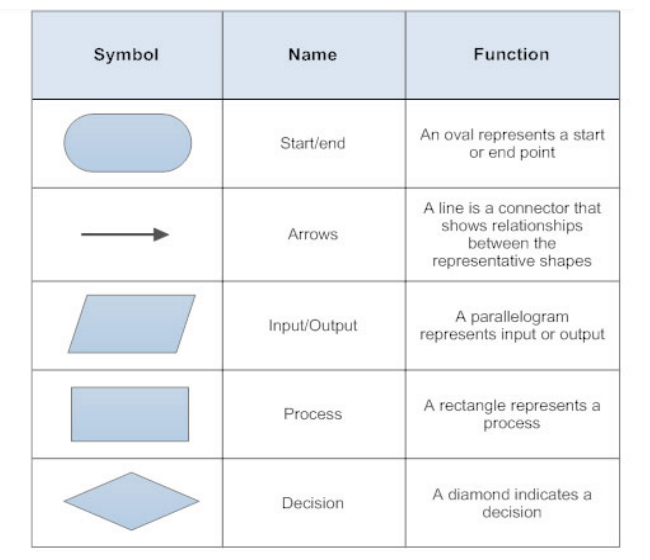
- Flowchart makes it easy to understand stepwise working of a process.
- It is commonly used in computer programming, engineering, education and physical sciences to perform various tasks.
Steps to make flowchart:
- Begin with START symbol.
- List the steps of the process (algorithm) using appropriate symbols.
- Step 6: Add arrows between symbols to show the flow of control.
- You End with STOP box.
- A flowchart has only one START box and one STOP box.
- The direction of flow in a flowchart is either from top to bottom or from left to right.
Decision Making
While writing computer programs, one uses the IF…ELSE statement for decision-making.
- When the condition after IF is true, the computer follows the instructions after THEN.
- When the condition after IF is false, the computer follows the instructions after ELSE.
This process is also known as conditional problem solving.
In algorithms, the IF…THEN…ELSE statement is used whereas in flowcharts, IS…YES…NO is used through a decision box.
Examples and Assignments
Algorithm to Calculate Simple Interest (SI)
Write an algorithm to find the Simple Interest (SI) by inputting the values of Principal(P), Rate(R) and Time(T).
- Step 1: START
- Step 2: INPUT P, R, T
- Step 3: Calculate the Simple Interest, SI = (P*R*T) / 100
- Step 4: PRINT SI
- Step 5: STOP
Example of decision making with algorithm and flowchart
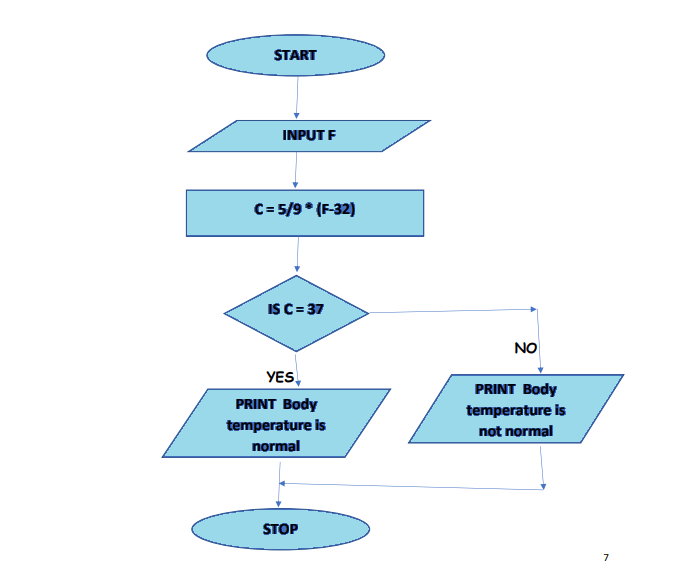
Question: Write an algorithm and draw a flowchart to enter temperature in Fahrenheit, convert it into Celsius and print whether the body temperature is normal or not.
ALGORITHM:
- Step 1: START
- Step 2: Read temperature in Fahrenheit, F
- Step 3: Calculate temperature in Celsius as C = 5/9 * (F – 32)
- Step 4: IF (C = 37)
- THEN
- PRINT Body temperature is normal
- ELSE
- PRINT Body temperature is not normal
- Step 5: STOP
Flowchart:
More ASSIGNMENT Questions:
- Q. What do you mean by pseudocode? Give 1 example.
- Q. What is an algorithm?
- Q. Mention the rules for writing an algorithm.
- Q. What is a flowchart? Write the rules for drawing a flowchart.
- Q. What is conditional problem solving?
- Q. Draw the different shapes used in a flowchart and give their uses.
- Q. Write an algorithm and draw a flowchart to find the circumference of a circle with a given radius.
- Q. Write an algorithm and draw a flowchart to find thegreater of 2 numbers input by the user.